

Upload Local Files
| Item | Details |
|---|---|
| Best for | Importing documents, audio, video, and images for parsing, search, and AI Q&A |
| Current limits | 20 MB per file on Basic, 40 MB on Pro, and 32,768 parsed words per file |
Try sending files to the WeChat Assistant or QQ Assistant!
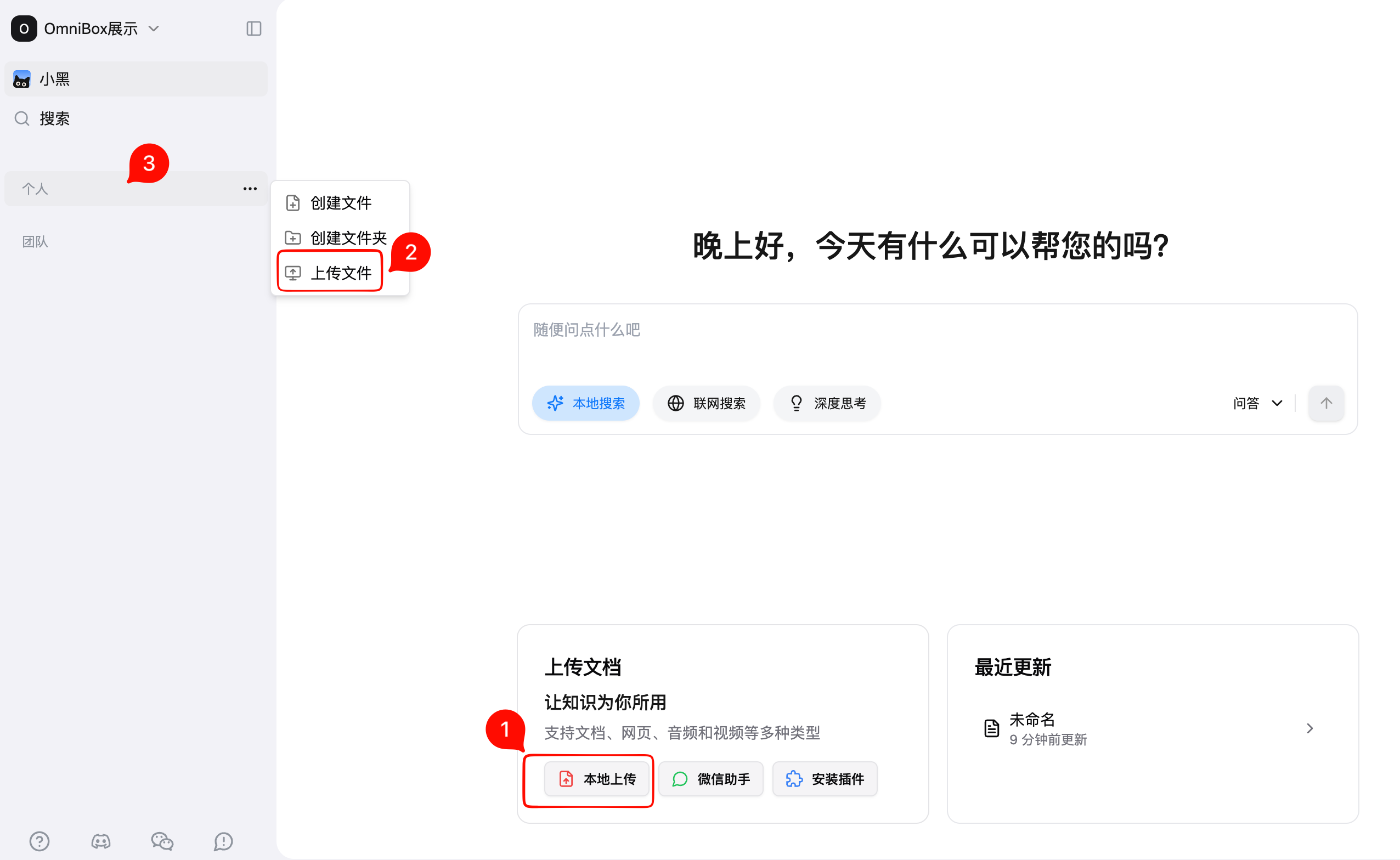
Currently, Basic namespace supports maximum single file size of 20 MB, Pro namespace supports maximum single file size of 40 MB, with 3 upload methods supported:
- Click the
Local Uploadbutton on the homepage to quickly upload files toPersonal - Click
Upload Filein the menu to upload files to a specified location - Drag and drop files directly to the sidebar to upload to a specified location
⚠️ Note: Currently, the word limit for parsing a single file is: 32,768. Content exceeding this limit will not be parsed.
Supported File Types
For supported file types, OmniBox will automatically parse them into editable documents.
| Type | Supported File Types |
|---|---|
| Documents | md, doc, ppt, docx, pptx, txt, pdf |
| Video | mp4, avi, mov, mkv, flv, webm |
| Audio | wav, mp3, m4a, pcm, opus, webm |
| Images | jpg, jpeg, png |