

Assistants
By connecting OmniBox assistants, you can easily manage your knowledge within your favorite chat applications.
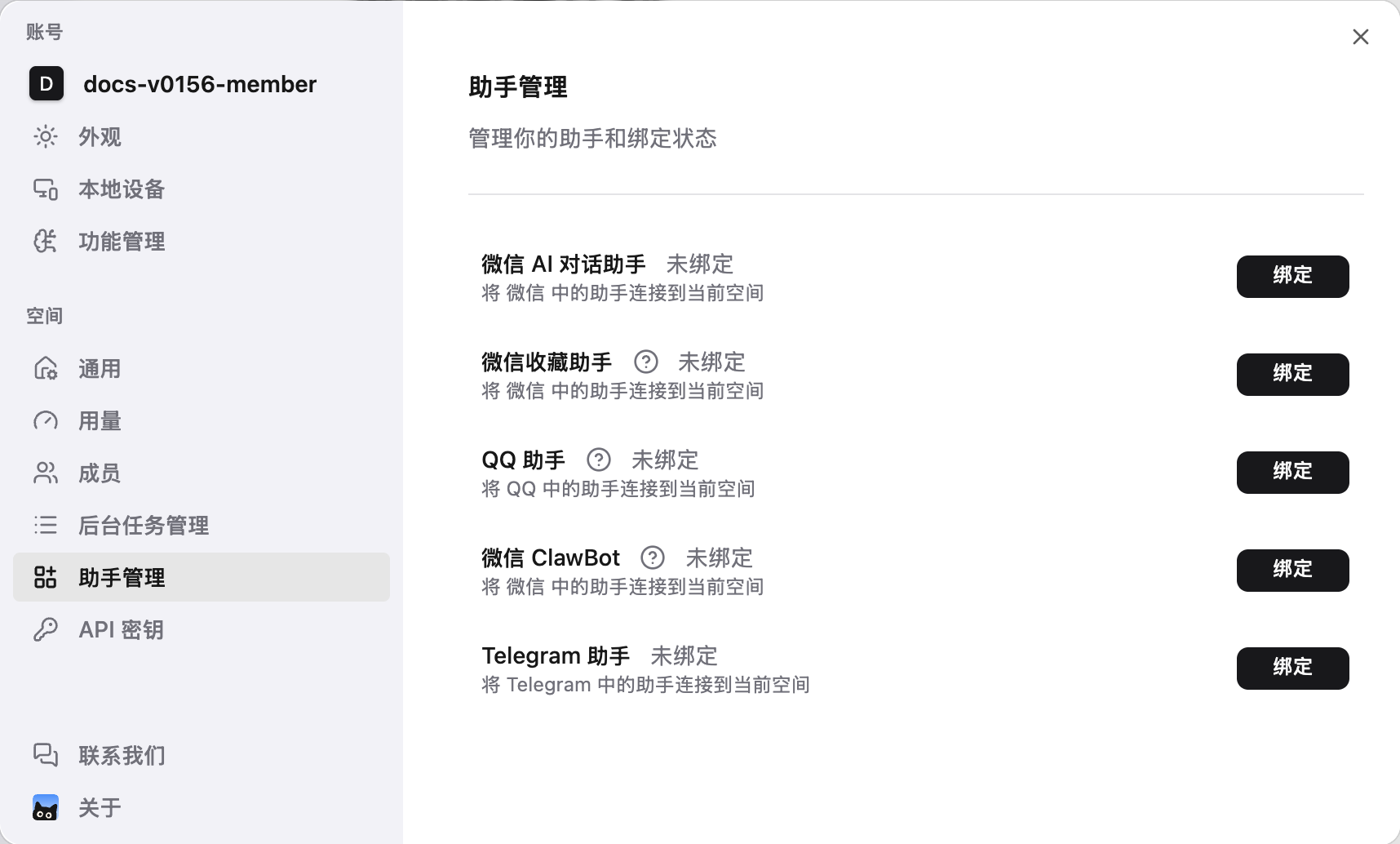
The Assistants page and each assistant binding page show whether the assistant is bound or unbound, making it easier to confirm the binding status for the current namespace.
Open Assistants
On the web, switch to the namespace you want to use and open Settings > Assistants.
The WeChat AI Chat Assistant appears first. Click Bind beside the assistant you need, follow the prompts, then return to this page to check its binding status.
The WeChat Assistant shortcut on the home page opens the WeChat AI Chat Assistant binding dialog. For the save-only assistant, choose WeChat Collection Assistant in Assistants settings instead.
Core Features
- Save Information: Save text, images, files, links and other content from chats to your knowledge base with one click
- Smart Q&A: Ask OmniBox questions directly in the chat window and get answers from your knowledge base. In WeChat ClawBot, QQ Assistant, and Telegram Assistant, Basic namespaces use Agent 1.1, while Pro namespaces can use Agent 2.1
- Auto Parsing: Supports web link parsing, speech-to-text, image recognition and other format processing
Three WeChat Assistants
- WeChat AI Chat Assistant: official account entry for chat and saving; available only to namespaces with an active Pro entitlement, not Basic namespaces
- WeChat Collection Assistant: save only, without Q&A
- WeChat ClawBot: chat entry for saving and Q&A, with a separate binding flow
Bind each assistant separately. Following the official account does not bind the Collection Assistant or ClawBot.
Use Cases
- 📚 Study Notes: Quickly collect and organize study materials and article links
- 💼 Work Collaboration: Save meeting notes and work documents, and retrieve them anytime through assistants that support Q&A
- 📰 News Management: Collect articles and news links to build your personal knowledge base
Supported Assistants
| Assistant | Save Info | Smart Q&A | Details |
|---|---|---|---|
| WeChat AI Chat Assistant | ✅ | ✅ | Through the official account; active Pro namespaces only, not Basic. Fallback to Agent 1.1 applies only while Pro entitlement remains active and Kibble is exhausted |
| WeChat Collection Assistant | ✅ | ❌ | Supports saving text, images, files, web links, etc. |
| QQ Assistant | ✅ | ✅ | Supports saving information and real-time Q&A. It auto-binds after you add it as a friend, and replies support Markdown rendering. Basic namespaces use Agent 1.1, while Pro namespaces support Agent 2.1 |
| WeChat ClawBot | ✅ | ✅ | Supports saving information and real-time Q&A. Basic namespaces use Agent 1.1, while Pro namespaces support Agent 2.1. Forwarding is not supported |
| Telegram Assistant | ✅ | ✅ | Supports saving information and real-time Q&A. Replies support Markdown rendering. Basic namespaces use Agent 1.1, while Pro namespaces support Agent 2.1 |