

Pricing
Overview
OmniBox offers Basic and Pro subscription tiers, along with flexible Add-ons and Purchase New Namespaces options to meet different usage scenarios.
Plan Comparison
| Feature | Basic | Pro |
|---|---|---|
| Price | Free forever | ¥39 / month (auto-renewing monthly ¥35 / month) |
| PDF / Image Parsing Quota | 600 pages/month | 3000 pages/month |
| Audio/Video Parsing Quota | 60 minutes/month | 300 minutes/month |
| Agent 2.1 | 200 credits / month | 1000 credits / month |
| Agent 1.1 | Unlimited | Unlimited |
| PDF / Image Single-parse Limit | 32 pages | 200 pages |
| Audio/Video / Mobile Recording Single-use Limit | 20 minutes | 120 minutes |
| File Upload Single-use Limit | 20 MB | 128 MB |
| Task Processing Speed | Standard | 3x faster |
| Response Speed | Standard | Priority |
| Open API Calls | 10 calls / 24 hours | 1000 calls / 24 hours |
| Smart Folders | 1 Private + 1 Team; up to 3 filter conditions each | More Smart Folders; up to 10 filter conditions each |
| Subscription Folders | 1 Private + 1 Team; up to 1 subscription link each | More subscription folders; up to 10 subscription links each |
| Search Filter Conditions | Up to 3 | Up to 10 |
| Storage Space | 5 GB | 50 GB |
| Recycle Bin Retention | 7 days | 30 days |
| WeChat Assistant | ✅ | ✅ |
| QQ Assistant | ✅ | ✅ |
| Other | Unlimited web/content collection | Unlimited web/content collection |
- 💡 Quarterly Discount: Save ¥6 with quarterly payment, as low as ¥1.06 / day.
- 💡 Annual Discount: Save ¥70 with annual payment, as low as ¥0.94 / day, equivalent to 3 months free.
- 💡 Auto-renewing Monthly Discount: Pro is ¥35 / month, as low as ¥1.25 / day.
Agent Credit Usage
Agent 1.1 does not consume credits and can be used without a credit limit. Agent 2.1 deducts credits based on the tokens actually used.
In the chat box, you can choose a model type (Default, Agent 2.1, Agent 1.1) and a thinking level (Low, Medium, High, Max). Default offers a recommended mix of models. Higher thinking levels usually consume more tokens. See Model Type and Thinking Level for how to switch.
The table below shows credits consumed per million tokens:
| Model type | Thinking level | Input | Cached input | Output |
|---|---|---|---|---|
| Agent 1.1 | Low / High / Max | None | None | None |
| Agent 2.1 | Low, Medium | 80 | 23 | 280 |
| Agent 2.1 | High, Max | 1200 | 150 | 3600 |
- At the same unit price, a higher thinking level usually produces more output tokens, so a single turn costs more.
- Scale reference: for about 10,000 input tokens and 2,000 output tokens, Agent 2.1
Low/Mediumuses about 1 credit, andHigh/Maxuses about 19 credits.- Basic namespaces receive 200 credits per month; Pro namespaces receive 1000 credits per month. When credits run out, buy an Agent 2.1 Credits Add-on or expand capacity in
Settings>Usage.- When Agent 2.1 credits run out, new conversations switch to Agent 1.1.
Add-ons
When your monthly quota runs out, you can temporarily supplement with add-ons. Buy what you need, no immediate upgrade required:
| Add-on Type | Content | Price | Validity |
|---|---|---|---|
| Image/Text Pages Add-on | 300 pages | ¥1 | Permanent |
| Audio/Video Duration Add-on | 25 minutes | ¥1 | Permanent |
| Agent 2.1 Credits Add-on | 100 credits | ¥1 | Permanent |
| Cloud Storage Expansion | 1 GB | ¥1 | Valid for 1 year |
⚠️ Purchase Notes:
- Add-ons are permanent: Buy as needed, no expiration
- Priority deduction: System prioritizes monthly quota, then add-ons
Purchase New Namespaces
When you need more namespaces, you can purchase additional ones:
| New Namespace Type | Benefits | Price | Auto-renewing Monthly Price |
|---|---|---|---|
| Basic | Full Basic namespace quota | ¥5 / namespace / month | ¥5 / namespace / month |
| Pro | Full Pro namespace quota | ¥44 / namespace / month | ¥40 / namespace / month |
⚠️ Notes:
- Pro namespace (¥44/month) = Basic namespace (¥5/month) + Upgrade to Pro namespace (¥39/month)
- Auto-renewing monthly discount: Pro namespace (¥40/month) = Basic namespace (¥5/month) + Upgrade to Pro namespace (¥35/month)
- Benefits: Content, quotas, and compute resources are completely independent across namespaces
- Use case: Suitable for multiple projects, team collaboration, or needing additional independent quotas
- Purchase note: Buying new namespaces ≠ increasing namespace quota (purchased namespaces have independent content, quotas, and compute that don't affect existing namespaces)
Membership Service Terms
| Membership Type | Service Period | Description |
|---|---|---|
| Monthly | 31 calendar days | Calculated from successful payment. If automatic renewal is not enabled, benefits terminate upon expiration. |
| Quarterly | 93 calendar days | Calculated from successful payment. If automatic renewal is not enabled, benefits terminate upon expiration. |
| Annual | 372 calendar days | Calculated from successful payment. If automatic renewal is not enabled, benefits terminate upon expiration. |
| Add-ons | Buy and use anytime, no expiration | Quota add-ons including: Image/Text pages, Audio/Video duration, and Agent 2.1 credits. |
How to Choose
- New OmniBox → Basic (Free)
- Heavy PDF and audio/video parsing user → Pro
- Need higher single-parse limits → Pro
- Large storage needs but stable usage → Basic + Purchase New Namespaces
- Multiple projects running in parallel → Basic + Purchase New Namespaces
- Temporary overage usage → Add-ons
Mobile APP Purchases
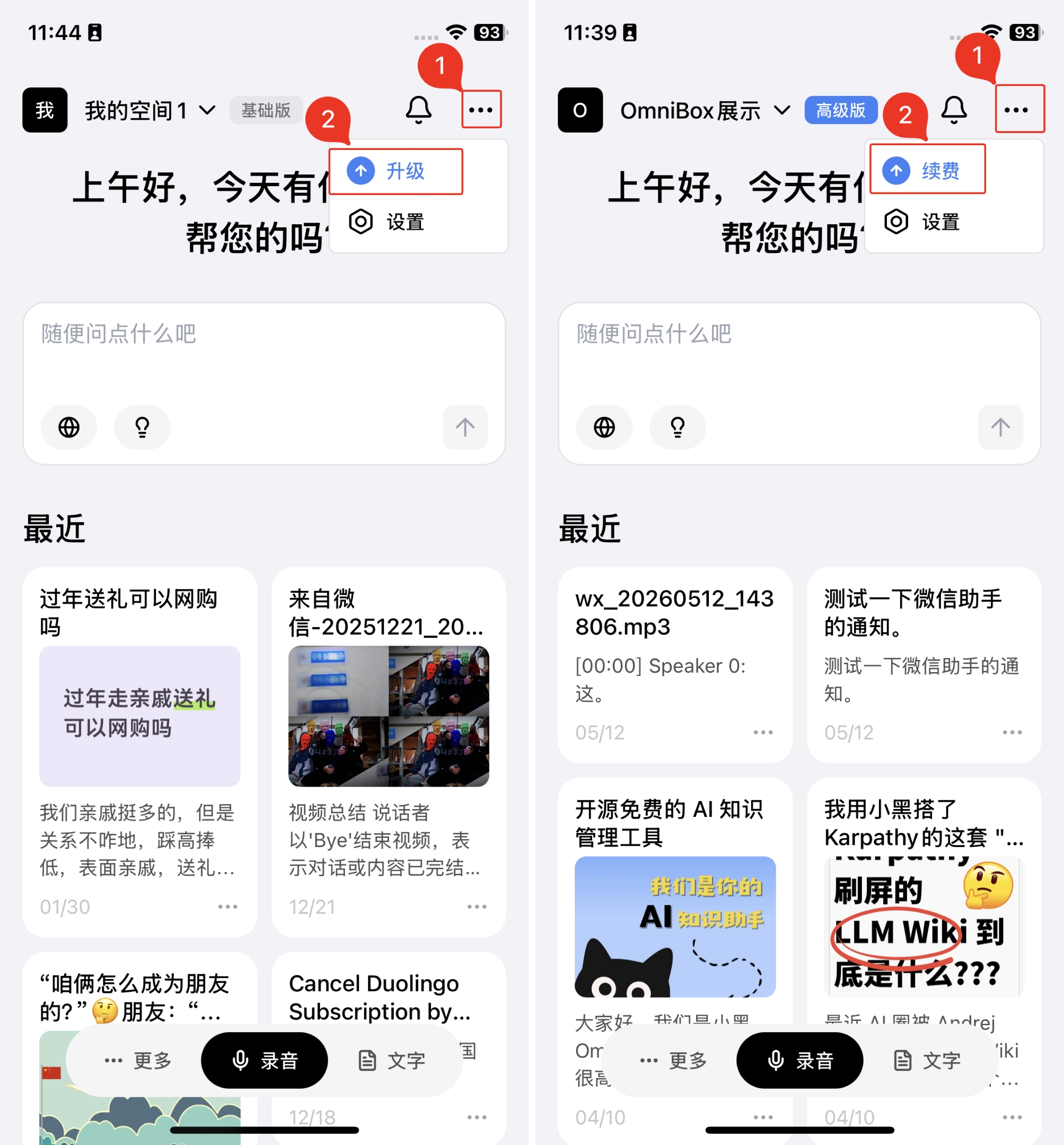
You can also upgrade, renew, and buy add-ons directly in the OmniBox Mobile APP.
The Mobile APP pricing page shows purchase options based on the currently selected namespace:
- For a Basic namespace, you can upgrade to Pro
- For a Pro namespace, the pricing page shows renewal options
- When you need temporary parsing quota or storage, you can choose add-ons on the pricing page and adjust quantities with the on-page quantity controls
- Before purchasing, make sure the namespace you want to upgrade, renew, or expand is selected
- Namespace owners can upgrade, renew, or expand capacity
On the Mobile APP order confirmation page, you can select the plan period and review the order details, promotion deduction, and final price. When upgrading to Pro, if the current Basic namespace still has remaining service time, the order page automatically calculates the difference between the Basic and Pro service periods.
Upgrade entry:
Payment Methods
Supported payment methods:
- WeChat Pay: supports enabling WeChat automatic renewal when upgrading or purchasing a new namespace, as shown on the page
- Alipay
- Apple payment: shown only in the iOS app when the order amount matches a supported App Store in-app purchase tier
You can visit Pricing in your browser to select the appropriate plan and payment method, or complete the purchase on the pricing page in the Mobile APP.
Promo codes are currently shown on non-iOS Mobile APP clients and on the web. For iOS in-app purchases, please follow what is shown in the app.
Upgrade & Downgrade
Upgrade: Available anytime, takes effect immediately.
Downgrade: Downgrade takes effect at the end of the current billing cycle.
Renewal
When upgrading a plan or purchasing a new namespace, you can enable WeChat automatic renewal as shown on the page. Orders without automatic renewal can still be renewed manually.
- If Pro expires without renewal, benefits revert to Basic tier
- If additional purchased namespaces expire without renewal, namespaces enter read-only mode and cannot add or edit content
- After a manual renewal or successful automatic renewal, normal functionality resumes and existing data is retained
Related Questions
Why charge?
OmniBox is currently in public beta and trial operation. Features like collection, parsing, sharing, team management, AI chat/writing, and WeChat Assistant are all free.
For resource-intensive capabilities like Storage Space, PDF Parsing, Audio/Video Parsing, and Agent 2.1, we provide monthly free quotas that automatically refresh to meet most users' daily needs. See Agent Credit Usage for how Agent 2.1 thinking levels consume credits.
When free quotas are exhausted, we offer Pro plans and pay-as-you-go options. See Pricing for details.
The purpose of charging is to ensure OmniBox's healthy growth. We hope to find a comfortable balance between user experience and commercial operation. We will continue to update and release more powerful features. You can join our User Community or Contact & Follow Us to get the latest product updates!
When do free quotas reset?
- For namespaces existing before February 7, 2026, free parsing quotas automatically reset every 31 days starting from February 7, 2026. (Each user has one Basic namespace as owner; other namespaces owned by the user are free for one year, i.e., 372 days)
- For namespaces created after February 7, 2026, free parsing quotas automatically reset every 31 days from the creation date.
Do add-ons expire?
No. Add-ons are permanent, buy as needed, with no expiration.
What happens to previously purchased add-ons after upgrading?
Previously purchased add-ons are retained. The system prioritizes monthly quota, then add-ons.
Can I get a refund?
Refunds are not currently supported.
Can I share quotas with others?
Team namespaces can share quotas. You can invite members to join your namespace to share quotas.
Is there a limit on purchasing add-ons or new namespaces?
No limit. Purchase as needed.
How do I check current quota usage?
You can view this month's quota usage details, namespace validity, and expansion entry in Settings > Usage. Namespace owners can expand capacity from there.